|
|
在C:\mis 创建 check_mcpos_ooh.bat, 内容如下
- @echo off
- setlocal enabledelayedexpansion
- set "LOGDIR=C:\mis\mcpos ooh"
- if not exist "%LOGDIR%" mkdir "%LOGDIR%"
- for /f "delims=" %%d in ('powershell -Command "Get-Date -Format yyyyMMdd"') do set "TODAY=%%d"
- set "LOGFILE=%LOGDIR%\check_run_mcposooh_%TODAY%.log"
- forfiles /p "%LOGDIR%" /m "mcpos_*.log" /d -21 /c "cmd /c del /f @path" 2>nul
- powershell -Command "$p = Get-WmiObject Win32_Process | Where-Object {$*.Name -eq 'mcpos.exe' -and $*.ExecutablePath -like '*\mcpos ooh*'}; if($p){$p.ProcessId}else{0}" > "%temp%\pid.tmp"
- set /p PID=<"%temp%\pid.tmp"
- del "%temp%\pid.tmp"
- if %PID% GTR 0 (
- echo [%date% %time%] The process is normal, PID=%PID% >> "%LOGFILE%"
- ) else (
- echo [%date% %time%] No process detected, preparing to start. >> "%LOGFILE%"
- Start /MIN "" "C:\mis\mcpos ooh\mcpos - Shortcut.lnk"
- echo [%date% %time%] Startup command executed >> "%LOGFILE%"
- )
- endlocal
在C:\mis 创建 silent.vbs, 内容如下
- Set sh = CreateObject("WScript.Shell")
- sh.Run "C:\mis\check_mcpos_ooh.bat",0
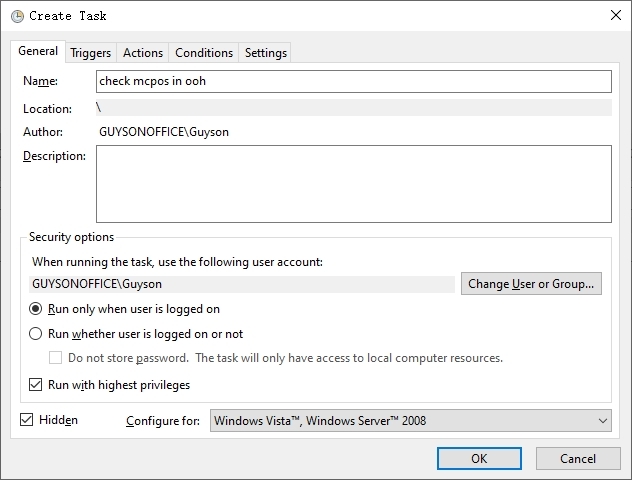
在Windows计划任务添加新任务:
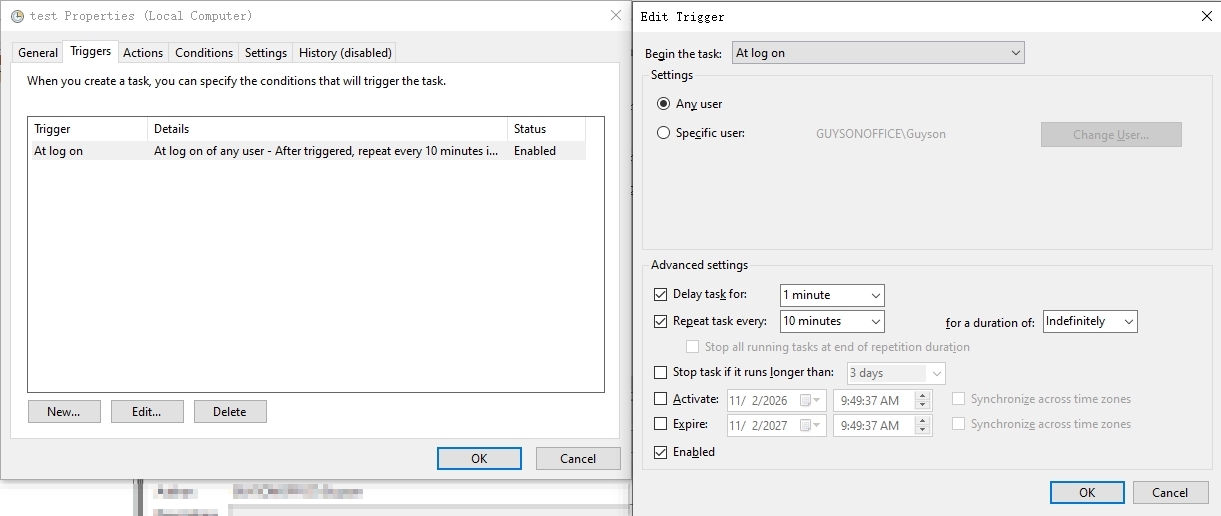
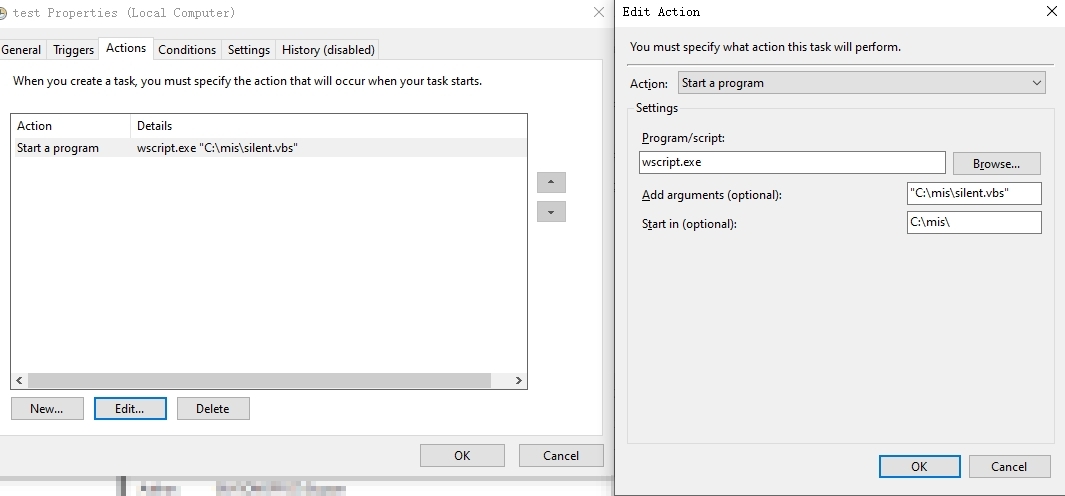
- 如图设置:
- 创建新任务, 名称: [check mcpos in ooh], 启用[Run with highest privleges], 启用[Hidden]
- 在Triggers页面, 添加新内容, 设置[At log on], [Delay task for 1 min], [Repeat task every 10min], [Indefinitely]
- 在Actives页面, 添加Start a program, Program/script: 填 [wscript.exe], 在add arguments添加 ["C:\mis\silent.vbs"], 在start in 添加[C:\mis\]
|
|



 发表于 2026-11-2 09:54:17